FaithSow
How to Set the Bedtime Timer in FaithSow
Want to set a time for a shared Bible story before bed? FaithSow's web Bedtime Settings includes a sleep timer. This guide shows where to find it, how to choose 30 minutes, and how to check that the displayed time is counting down.
1. Open Bedtime Settings and check the current selection
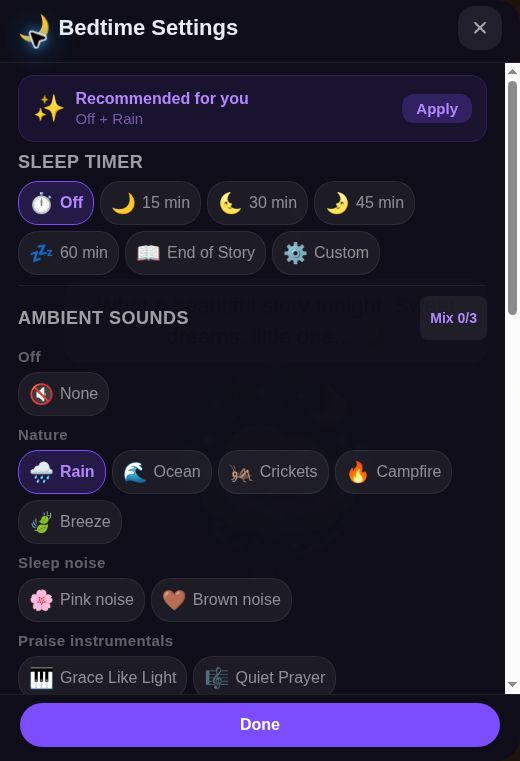
Open a story available to you and choose Bedtime Mode. If you are continuing a completed story, select Continue, then Say goodnight to reach the goodnight screen. Select the moon button there to open Bedtime Settings, and look for SLEEP TIMER. Depending on the version, you may need to scroll inside the panel.
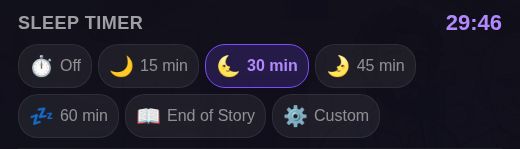
The first image shows settings over the goodnight screen; the next two focus on the timer controls. Off is selected in the first image; check your own current selection instead of assuming every session starts with the timer off.
Keep the story and settings in the same language so you can match the labels below. This walkthrough focuses on the timer, not the ambient-sound controls in the same panel. You do not need to change those controls to follow the steps shown here.
2. Select 30 minutes
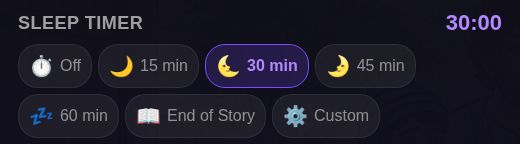
Under SLEEP TIMER, select 30 min. In the second screenshot, that choice is highlighted and the panel displays 30:00. Those two details help you confirm that you selected the intended duration rather than simply opening the settings panel.
The panel also shows 15 min, 45 min, 60 min, End of Story and Custom. This guide uses 30 min as an example; choose a duration that fits your own shared-reading plan.
If you are checking your own selection, compare the highlighted duration with the time beside SLEEP TIMER. Do not use this example’s thirty minutes as a recommended screen-time allowance; choose your own shared-reading plan.
3. Check that the countdown changes
Leave the panel open briefly and compare the time. Here it changes from 30:00 to 29:46 while 30 min remains highlighted.
When you no longer want a timed setting, choose Off in the same row, then select Done to close the panel.
The changing countdown shows that the selected time is passing; it does not tell you exactly what will happen at zero or whether audio stops then. Check the screen and sound when using the timer. A timer is not a promise of better sleep.
A free label on a story does not mean every story or account has the same access. Open content already available to you and look for the timer controls.
Make the setting part of shared reading rather than a substitute for an adult’s involvement. Choose a story together, confirm the timer selection, and decide together when to finish.