FaithSow
Choose and combine ambient sounds in FaithSow
Want to keep one background sound selected after a bedtime story, or try a two-sound combination? FaithSow’s bedtime settings let you select Rain, add Ocean, and return to Rain alone. This guide follows that small, reversible configuration sequence so you can see exactly what changes on screen.
Start with one selected sound
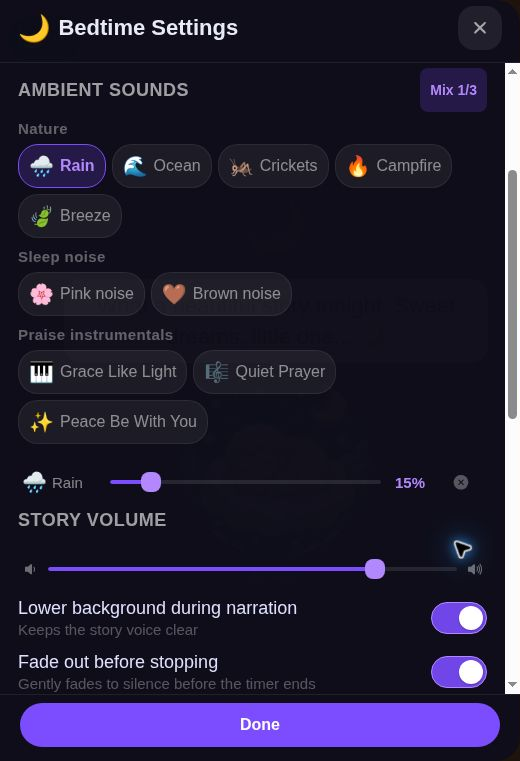
Open an available story in Bedtime Mode and open Bedtime Settings. The first two screenshots focus on the ambient sound controls and do not show the surrounding story screen. Find Ambient Sounds and enable Mix, then select Rain. The observed selection indicator reads Mix 1/3.
Rain has a highlighted option and its own row below the sound choices. In this example that row shows 15%. Use the option highlight, the selected-sound row, and the count together to check your configuration. A number on a sound row describes the displayed setting; it does not tell you how loud the sound will be on your particular device.
For a parent and child making a choice together, starting with one selection keeps the decision clear. You can leave Rain selected rather than adding more options simply because they are available. This walkthrough does not use the recommendation card or change the sleep timer.
Add Ocean and check both rows
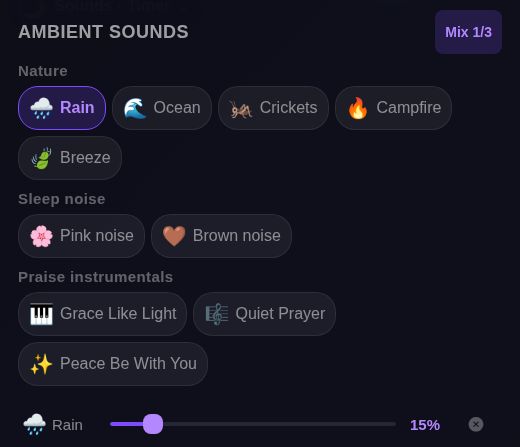
With Rain still selected, select Ocean. Both choices are now highlighted and the indicator changes to Mix 2/3. The panel shows a separate row for Rain and a separate row for Ocean, rather than replacing Rain with the new choice.
Rain and Ocean each have their own slider; the values shown here are 15% for each. These are individual controls, not a shared mix slider. Story Volume is a separate control outside this cropped image. Check the labels before adjusting a slider.
This gives you a simple way to compare configurations with your child: one selected option first, then two. The screenshots establish the selection states and the visible controls. They do not establish that both audio tracks were heard, that playback stays synchronized, or that this combination helps a child sleep.
The count includes a denominator of three. This walkthrough only selects two sounds; it does not demonstrate a third selection or what happens at the limit.
Remove Ocean and return to Rain alone
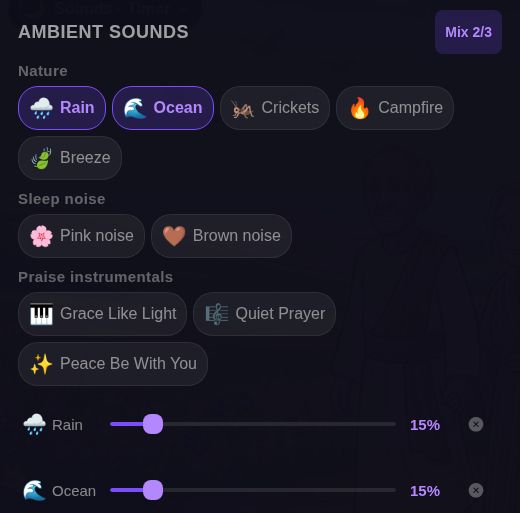
To return to the first configuration, use the small remove control at the right of the Ocean row. Ocean's row disappears, Ocean is no longer highlighted, and Mix returns to 1/3. Rain remains highlighted with its row at 15%; you do not need to clear Rain to keep it selected.
Check the remaining row before making another choice. Removing one item from the combination is different from turning off every ambient sound. Here the result is one selected sound, not an empty selection.
Removing Ocean changes the selected options shown on screen. Check what you hear before drawing conclusions about playback; narration and fade have separate controls nearby.
For shared reading, use this as a configuration guide: begin with one choice, add a second if you want to compare, and remove that second choice when you prefer the simpler selection. No particular sound or percentage is presented as a sleep recommendation.